
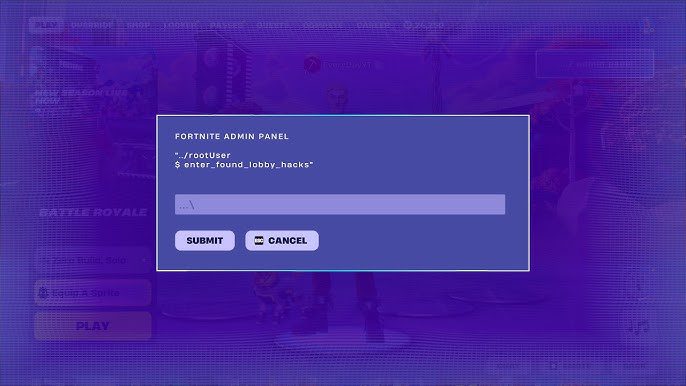
To use a Cheat Code in Fortnite Chapter 7 Season 4, select the Admin Panel from the lobby, enter a valid code and submit it to receive the reward or effect attached to that code. Override introduces the Admin Panel as part of its wider hacking theme, giving players another way to unlock items and other bonuses without entering a Battle Royale match first.
THE CLICK • INTERACTIVE TRACKER Fortnite Sprite Tracker Track all 162 Sprites, save your Level 1–5 progress and see exactly which ones you still need to master. ✓ OWNED1–5 LEVELS★ MASTEREDSAVES LOCALLYUsing a Cheat Code only takes a few seconds once you know where the Admin Panel is. The important part is having a valid Chapter 7 Season 4 code to enter.
How to Use a Cheat Code in Fortnite
To use a Cheat Code in Fortnite:
- Launch Fortnite.
- Stay in the main lobby.
- Select the Admin Panel.
- Choose the option to enter a code.
- Type the Cheat Code exactly as it appears.
- Submit the code.
- The associated item, reward or effect will be granted if the code is valid.
You do not need to enter a Battle Royale match before using the Admin Panel.
Where Is the Fortnite Admin Panel?
The Fortnite Admin Panel can be selected directly from the lobby in Chapter 7 Season 4.
This is where you enter the codes discovered during Override.
If you have a code but cannot work out where to use it, do not try entering it into a normal Battle Royale interaction. Return to the lobby and open the Admin Panel instead.
What Do Fortnite Cheat Codes Give You?
Different Cheat Codes can provide different rewards or effects.
Entering a valid code into the Admin Panel activates whatever has been attached to that particular code.
That means there is no single reward for using a Fortnite Cheat Code. What you receive depends entirely on which code you enter.
This also gives players a reason to keep checking newly discovered codes throughout Chapter 7 Season 4 rather than assuming one code unlocks everything.
Do You Enter Cheat Codes During a Match?
No. The Admin Panel used to enter these codes is accessed from the Fortnite lobby.
This is separate from the interactive systems you may encounter while actually playing Battle Royale.
If you have found a code online and want to redeem it, the lobby Admin Panel is the place to use it.
Are Fortnite Cheat Codes the Same as Cheat Code Panels?
No, and the names make this slightly confusing.
Chapter 7 Season 4 has more than one hacking-themed system.
The Admin Panel is accessed from the lobby and allows you to manually enter discovered codes.
The Cheat Code panels found during gameplay are physical interactions on the Battle Royale Island and work differently.
So if somebody shares a text code with you, use the Admin Panel in the lobby rather than searching for somewhere on the map to type it.
Why Is My Fortnite Cheat Code Not Working?
If a Cheat Code is not working, first check that you have entered it exactly as it was provided.
Pay attention to:
- Letters
- Numbers
- Capitalisation
- Similar-looking characters
- Extra spaces
You should also make sure you are using the Admin Panel in the Fortnite lobby.
Entering a lobby code into an in-match Cheat Code interaction will not work because they are separate Override systems.
Do You Have to Restart Fortnite After Entering a Code?
A valid Cheat Code grants its associated reward or effect after it is successfully submitted through the Admin Panel.
You should not need to reinstall Fortnite or make changes to your account simply to use a Chapter 7 Season 4 code.
If you have entered the code correctly, check for the reward or change associated with that specific code.
Can You Use More Than One Fortnite Cheat Code?
Chapter 7 Season 4 has multiple codes to discover, with different codes linked to different rewards and effects.
That means the Admin Panel is not designed around entering one permanent universal code.
As more Override codes are discovered, players can return to the Admin Panel and enter them individually.
Where Do You Find Fortnite Cheat Codes?
Cheat Codes are being discovered as players explore Chapter 7 Season 4 and the wider Override promotion.
Once you have a valid code, the actual redemption process is simple: open the lobby, select the Admin Panel and enter it.
Keeping a list of working codes is therefore much easier than repeatedly searching for instructions on where each one needs to be redeemed.
Fortnite Admin Panel Explained
The Admin Panel is essentially the home for Chapter 7 Season 4’s redeemable Cheat Codes.
It fits Override’s wider theme of hacking and changing the rules of Fortnite, while giving players a very simple way to activate discovered codes.
The process is:
Lobby → Admin Panel → Enter Code → Submit → Receive Reward
Once you know that, using any new Fortnite Cheat Code you come across should take only a few seconds.
How to Use a Cheat Code in Fortnite Explained
To use a Cheat Code in Fortnite Chapter 7 Season 4, stay in the main lobby and open the Admin Panel.
Enter the valid code exactly as it appears and submit it. If the code is active, Fortnite will grant the item, reward or effect associated with it.
The Admin Panel system is separate from the Cheat Code panels found inside Battle Royale, so any text-based codes you discover should be entered from the lobby rather than during a match.





