

Fortnite Safety in Numbers Rewards are five free Halloween cosmetics earned by collecting XP in Horror Creator-made Islands with friends. You need to complete ten identical quest stages, with a prize awarded after every second stage. The final prize is the Cuddlz Back Bling, and you can also earn two Pickaxes, a Loading Screen and a Banner.
There’s an easy way to waste time on these quests: playing ordinary Battle Royale or Reload. Neither counts. You need an eligible creator-made Horror island and at least one other player in your party. Here’s how to start the quests, what every milestone unlocks and how much XP you need.
All Fortnite Safety in Numbers Rewards and unlock requirements
The Fortnite Safety in Numbers Rewards unlock at two, four, six, eight and ten completed quests. Every stage asks you to earn 80,000 XP in an eligible Horror Creator-made Island while grouped with friends. That means the full chain requires 800,000 eligible XP.
| Quests completed | Reward | Cosmetic type |
|---|---|---|
| 2 | Homebase Banner | Banner |
| 4 | Tarnished Crowbar | Pickaxe |
| 6 | Welcome to Harrowville | Loading Screen |
| 8 | Chilling Claws | Pickaxe |
| 10 | Cuddlz | Back Bling |

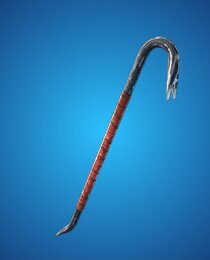
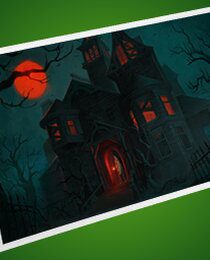
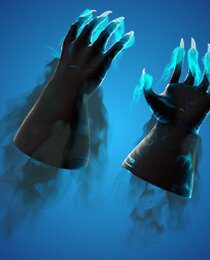
The first reward is a Banner after two quests. The Tarnished Crowbar follows at four, Welcome to Harrowville at six, Chilling Claws at eight and Cuddlz at ten. These are Locker cosmetics, not unlocks from the paid Battle Pass.
How to start the Safety in Numbers quests
To earn Fortnite Safety in Numbers Rewards, open the Discover screen and find the Horror category. Select an eligible creator-made island, then check the Quests tab. The Safety in Numbers quest chain may not display while you have a normal Battle Royale mode selected.
- Invite at least one friend to your Fortnite party.
- Open Discover and choose a Horror Creator-made experience.
- With that island selected, find the Safety in Numbers quests in the Quests tab.
- Enter the island together and earn XP through its gameplay and activities.
- After collecting 80,000 XP, check the next quest stage and continue until you finish all ten.
Being in a public lobby with strangers isn’t necessarily the same as joining a party with a friend. The quest specifically requires party play, so set that up before trying to earn progress.
How much XP do you need for each free cosmetic?
Each quest stage needs 80,000 XP. You’ll reach the first free cosmetic at a total of 160,000 eligible XP, the second at 320,000, the third at 480,000, the fourth at 640,000 and the last after 800,000. Finishing a stage also awards 10,000 regular XP, helping your account level up while you work through the chain.
You don’t have to stay on one island for the entire event. If a creator-made Horror island is awarding XP and the game is registering it against your quest, you can keep playing there or switch to another eligible experience when you want some variety. Watch the progress bar rather than trusting an island’s advertised XP claims.
When do the Fortnite Safety in Numbers quests end?
The event tracker lists 12 November 2026 as the end of Safety in Numbers. Some gaming guides instead state 31 October, so the reported deadline is inconsistent. Check the countdown displayed in your own Quests tab before leaving the reward grind until the last day.
The Fortnite Safety in Numbers Rewards are a separate track from the general Fortnitemares quests, which may end on a different date. Finishing the Halloween Battle Royale tasks won’t automatically complete the ten Horror-island XP stages.
Why isn’t Safety in Numbers XP counting?
First, check your selected mode. Normal Battle Royale, Zero Build, Reload and OG won’t count, even if the match has a Halloween theme. You have to choose an experience from the Horror Creator-made category and play while you’re in a party.
Second, confirm the map actually awards XP and that your quest progress changes after some gameplay. Not every user-made island qualifies simply because it looks frightening. If you’re unsure, return to Discover and choose an experience shown in the eligible Horror collection.
Finally, make sure your party stayed together and that you’re looking at the current quest stage. Players sometimes mistake XP towards their Battle Pass level for XP credited to the event, but those counters aren’t always interchangeable.
Can you complete Safety in Numbers alone?
Not in the intended way. The ten quests specifically call for XP earned in Horror Creator-made Islands in a party with friends. Going into a public island by yourself may let you play the map and earn normal XP, but it won’t necessarily satisfy the party condition.
You don’t need to buy access to the islands, and there’s no reason to purchase a special cosmetic to participate. Joining a friend and choosing a qualifying map is enough to start working towards the Fortnite Safety in Numbers Rewards.
Where to find the five rewards after completing the quests
When you complete the required number of stages, check your Locker. The Banner Icon is in the banner customisation options, Tarnished Crowbar and Chilling Claws are Pickaxes, Welcome to Harrowville is a Loading Screen and Cuddlz is a Back Bling.
If you have passed a milestone but can’t see its item, check the quest’s completion status and restart Fortnite before troubleshooting further. Make sure you search the appropriate cosmetic category, rather than expecting every reward to appear among Outfits.
More free Fortnite cosmetics available now
If you’ve finished the Horror island chain, the free Fortnite cosmetics tracker brings together other claimable rewards with pictures and advertised deadlines. There are separate Fortnitemares quests, seasonal Sprite rewards, Twitch Drops and account-link promotions.
The Fortnite Safety in Numbers Rewards are especially useful because all five come from repeatable gameplay rather than tournament placement. If you prefer regular Battle Royale, our Fortnitemares quest guide covers the different Halloween milestones there.
Related Guides
Official game information: Fortnite News. Current milestone details should be checked against the in-game Safety in Numbers quest panel before claiming.





