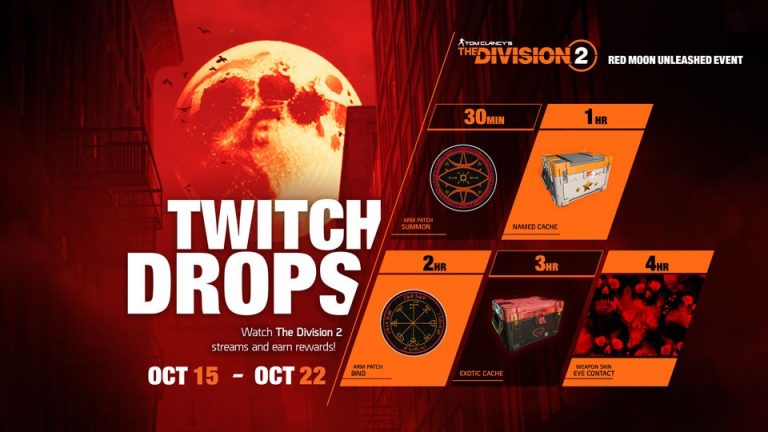
The Division 2 Echoes of Central Park Twitch Drops run from 10 to 17 November 2026. Watching eligible Division 2 streams earns five rewards, beginning with the Gnarled Arm Patch at 30 minutes and finishing with The Block Weapon Skin after four hours.
You don’t have to buy the premium Event Pass to take part. Link Twitch to the Ubisoft account you play on, watch a participating creator and press Claim when each item unlocks. Watching alone won’t send the items to your game.
The Division 2 Echoes of Central Park Twitch Drops: all five rewards
These are the five The Division 2 Echoes of Central Park Twitch Drops. The watch times are cumulative, so four hours gets you through the whole list.
| Total watch time | Reward |
|---|---|
| 30 minutes | Gnarled Arm Patch |
| 1 hour | Named Cache |
| 2 hours | Wrong Path Arm Patch |
| 3 hours | Exotic Cache |
| 4 hours | The Block Weapon Skin |
The patches and The Block skin are cosmetic rewards. Named and Exotic Caches contain in-game loot, but Ubisoft hasn’t promised a specific weapon from either one. The Block changes a weapon’s appearance; it isn’t a new gun.
How to link Twitch and Ubisoft Connect
Make sure you’re using the Ubisoft account connected to your Division 2 character. If you’ve played on PC and console, check the platform links carefully before spending four hours watching streams.
- Sign in to the Ubisoft Connect account you use for The Division 2.
- Connect your Twitch account through Ubisoft’s official Drops or account connections setup.
- Confirm that the PC, PlayStation or Xbox account where you play is linked to the same Ubisoft identity.
- Open a Drops-enabled Division 2 stream from a participating creator on Twitch.
- Watch until a milestone is complete, then open your Twitch Drops Inventory and select Claim.
- Launch or return to The Division 2 on the linked platform to receive your claimed item.
Twitch, Ubisoft Connect and your preferred PC or console account all need to be connected correctly. Using a spare Twitch login won’t send rewards to your usual character.
Can you watch different streamers and still earn The Block skin?
Yes. Ubisoft says watch time carries over between eligible partnered channels. If one creator signs off halfway through, switch to another running this campaign without starting again.
Not every Division 2 stream counts. If your progress bar stops moving, make sure the new channel has Drops enabled. Four hours is the final total milestone, not four more hours after the Exotic Cache.
How to claim The Division 2 Echoes of Central Park Twitch Drops
Each reward has a claim step in Twitch Inventory. Claim the Gnarled Arm Patch at 30 minutes, the Named Cache at an hour, Wrong Path Arm Patch at two hours, Exotic Cache at three and The Block Weapon Skin at four.
Check Twitch Drops Inventory as you go and make sure each item says Claimed. Then sign into The Division 2 on your linked gaming account.
Ubisoft’s announcement doesn’t give one specific delivery menu for every reward. If a claimed item is missing, double-check the linked gaming account before searching through unrelated inventory screens.
What time do The Division 2 Echoes of Central Park Twitch Drops end?
The Division 2 Echoes of Central Park Twitch Drops end on 17 November 2026. Ubisoft hasn’t given an exact UK closing hour, so follow the countdown on Twitch rather than assuming a midnight deadline.
These are not the launch Twitch Drops from 3–10 November. The earlier event offered different items, including the Central Park Arm Patch and Bird Skull Backpack Trophy. For The Division 2 Echoes of Central Park Twitch Drops, the final four-hour prize is The Block Weapon Skin.
Do you need to own Echoes of Central Park or buy the Event Pass?
The Twitch campaign is separate from the free and 1,000 VC premium Event Pass tracks running until 24 November. You do not need to buy the premium track just to claim The Division 2 Echoes of Central Park Twitch Drops.
You still need access to The Division 2 to use the items in-game. Ubisoft hasn’t stated that purchasing the separate Echoes DLC is a condition of this Twitch campaign, so don’t spend money based on that assumption. Our free Event Pass guide
Why are my Twitch rewards missing?
If The Division 2 Echoes of Central Park Twitch Drops aren’t appearing, first check whether the Twitch reward says Claimed, not merely unlocked. Then verify that Twitch is linked to the Ubisoft account associated with your PC, PlayStation or Xbox account.
Restart The Division 2 after claiming. If the account links are right and the item still doesn’t arrive, contact Ubisoft support with the reward name and its Twitch claim status. Buying the premium pass won’t fix a missing Twitch Drop.
The Division 2 Echoes of Central Park Twitch Drops: related guides
Official publisher source: Ubisoft’s Echoes of Central Park Twitch Drops announcement.