The Witch’s Bakery Estelle romance bug could permanently lock Estelle’s second heart after a particular theatre conversation. Developer Sunny Lab confirmed the cause, released a fix on 19 October 2026 and shared a separate recovery procedure for PC players whose saves had already been affected.
If Estelle’s relationship isn’t progressing, your next step depends on whether you’re still approaching the scene or have already triggered the broken dialogue. The latest patch prevents the issue, while an existing locked save may need a careful manual correction. Here’s the precise route the developer documented.
What caused The Witch’s Bakery Estelle romance bug?
The problem occurred after filling Estelle’s second heart. She invites Lunne to the theatre, and accepting immediately leads into dialogue about Estelle’s interest in art. The affected choice appeared near the start of that conversation.
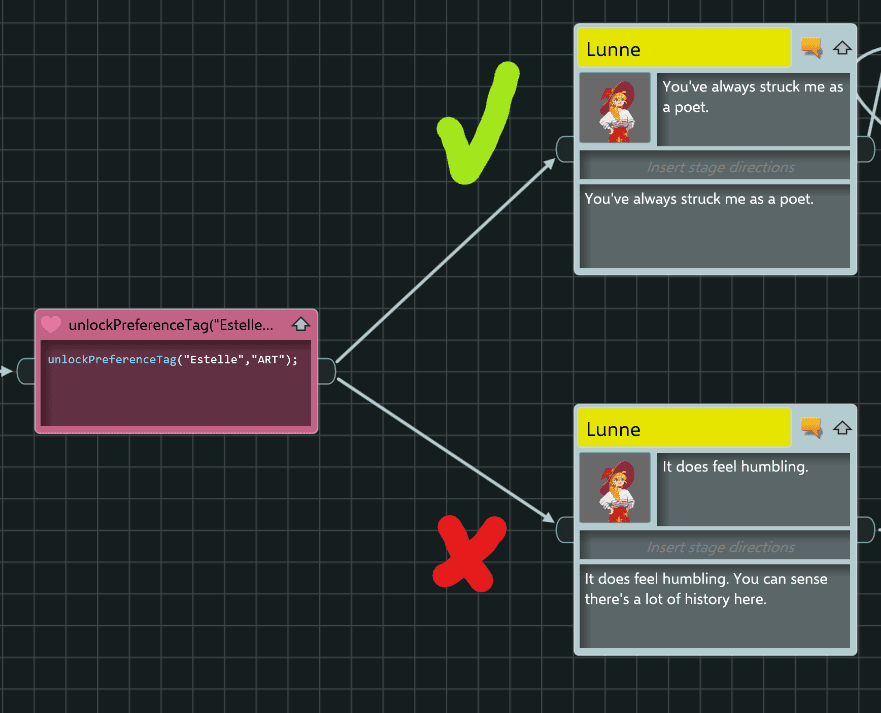
Sunny Lab identified the lower, humbling answer as the one that could leave the second heart locked. It wasn’t a hidden romance failure state or a punishment for choosing the wrong line. It was a genuine progress-blocking bug.
The Witch’s Bakery Estelle romance bug was first explained publicly on 17 October. The studio updated that announcement on 19 October, confirming the fix was live at 3 p.m. French time. Players using the corrected version should be able to progress without following the old workaround.
Which dialogue choice worked before the patch?
On earlier builds, the developer recommended this sequence to avoid The Witch’s Bakery Estelle romance bug:
- Fill Estelle’s second relationship heart.
- Accept her invitation to the theatre if you want to attend immediately.
- During the early theatre conversation, reach the choice where her Art preference is unlocked.
- Select the top answer: “You’ve always struck me as a poet”.
The alternative lower answer was the one associated with the bug. This was a temporary avoidance method, not a requirement for a successful romance on the patched version.
How to fix The Witch’s Bakery Estelle romance bug in an existing save
Sunny Lab provided a manual PC save-file recovery process for people who had already triggered the broken choice. The steps below change the specific relationship lock flag. Close the game first, and back up your file before editing it.
- Open Windows File Explorer and navigate to
C:\Users\YOUR_USERNAME\AppData\LocalLow\Sunny Lab\The Witch's Bakery\GameFiles\Slot_0. ReplaceYOUR_USERNAMEwith your Windows profile name. - Find
Save.lunneand duplicate it somewhere safe. - Open the original
Save.lunnewith Notepad or another plain-text editor. - Find the exact identifier
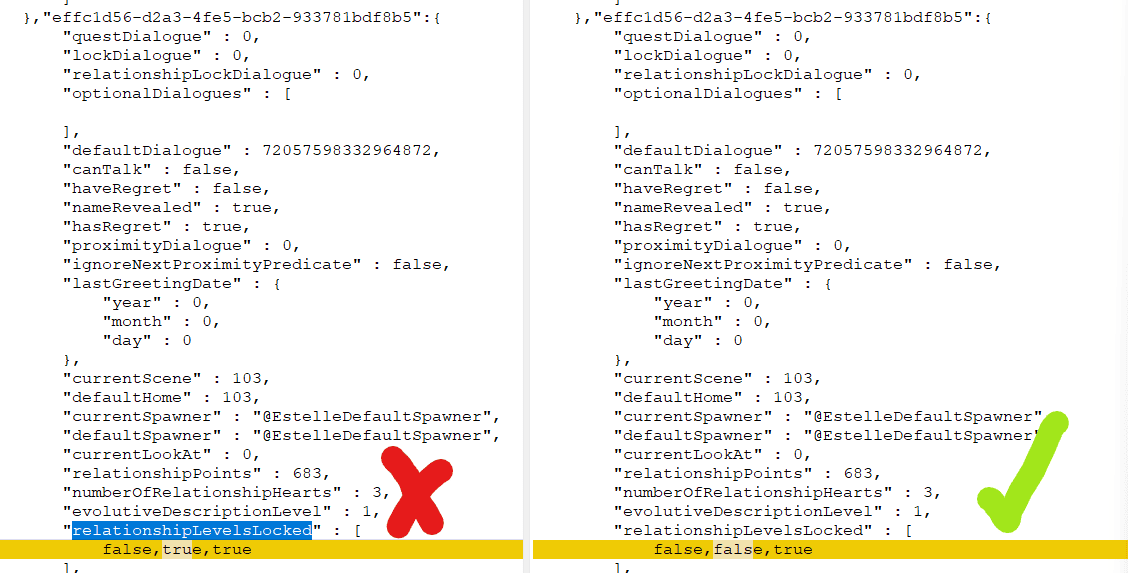
effc1d56-d2a3-4fe5-bcb2-933781bdf8b5. - In that entry, locate
relationshipLevelsLockedand change its value fromtruetofalse. - Save, restart the game and check Estelle’s second-heart progression.
If the identifier isn’t present, stop. Changing another relationship’s flag could cause a different issue. These instructions are specifically for the affected PC save described by the developer, not a general save-file repair method.
Will the save edit restore the missing theatre scene?
Not completely. The recovery for The Witch’s Bakery Estelle romance bug unlocks the relationship so later events can proceed, but Sunny Lab says the affected theatre scene remains skipped. The correction fixes progression rather than resetting that part of the story.
After making the change, return to normal gameplay and see whether Estelle’s relationship can advance again. Keep the backup until you’re certain the save is working. You don’t need to repeat the edit if the game has already updated and your relationship is progressing normally.
Has The Witch’s Bakery Estelle romance bug been fixed?
Yes. Sunny Lab marked the relationship fix live on 19 October 2026. Before attempting any manual changes, let Steam update the game to the current public release. The save-file steps are intended for playthroughs whose relationship state was already locked by the old problem.
The developer’s announcements also mention fixes for other quests and Heart Dive activities. If a different character’s relationship or a bakery puzzle is stuck, the Estelle identifier above isn’t a universal fix. Check the particular issue and update notes instead.
For anyone coming from the demo, there’s another unrelated save issue: demo saves are incompatible with the full game, and Sunny Lab instructs players to start a new file rather than choosing Continue on an old demo save. Don’t confuse that with the Estelle second-heart issue.
Where to get help if Estelle is still locked
If The Witch’s Bakery Estelle romance bug persists after installing the patch and following the correct steps for your save, visit Sunny Lab’s official Steam announcements and open the 17 October Estelle notice, updated on 19 October. The developer invites players to ask for help with affected saves.
You can also consult our PC requirements guide and release and platform guide. The separate demo save guide covers Steam branch selection and starting a fresh full-game save.